Technology and iPad apps for Toddlers

My daughter is about to turn 18 months in a few days and different to how her mom and I were brought up, she has been immersed in technology from day one. The first time I shared a picture of her was when I predicted that a female blogger was born on my blog. Given that mom and dad run an IT Consulting Firm, does not help the fact that gadgets are laying around which are used for work but our daughter can find a way to play with them.

When it comes to technology our daughter interacts with technology mainly via IOS apps.

IOS Apps ( iPad & iPhone )

Now that my daughter is able to talk she requests her favorite apps on the iPad by name such as Toy Story Read-Along, Wood Puzzle,  Curious George at the Zoo, GarageBand and lately the Elmo Loves ABCs app.

She really enjoys apps that have music or music videos.

Youtube

Since our daughter enjoys Music, I tend to find Music Videos that play music in all genres and appropriate for her. I also recommend that if you’re a stay at home dad  (parent) like me, it might be a good idea to have more than one monitor (It helps with productivity). Overall her favorite videos come from our friend Payasa Agapita. Agapita is a bilingual clown who primarily creates videos in Spanish (great if you want kids to learn Spanish).

Here is her latest video including her clown pals Che-Che and Potoco with some really cute dogs.

Since our daughter is still developing in all areas (language, physical, sensory skills) we keep her immersed with technology but thankfully we have a balance keeping her busy doing manual things. As much as she enjoys watching videos online and playing her favorite iPad apps, she also enjoys going outside smelling Basil in our garden, playing with rice, water,  reading, painting, and searching for the moon at night.

What technologies do your kids like and interact with?

What restrictions do you put upon them?

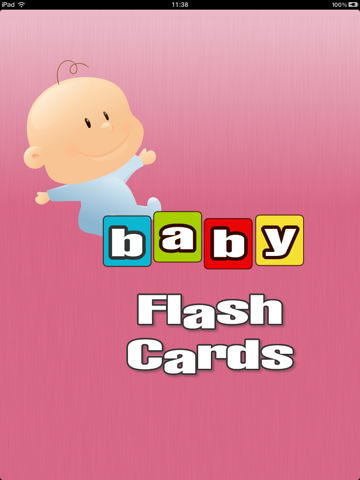
Baby Flash Cards – iPad (iOs app)

To teach our young sidekicks the value of technology I believe it is critical to start with tools that help them learn at an early age.

At our house we have been using our iPad to have our daughter create images on it. She is very curious and I guess that since she sees us touching the screen she is replicating our behavior.

We recently bought an iOs App named Baby Flash Cards that brings up images of an animal and plays a sound when touched.

It helps the child understand at an early age cause and effect. If they touch the screen in one way they hear the sound that animal creates, if they swipe the screen the move to another animal.

I think the Baby Flash Cards App is very simple and easy to use.

However I think the app can be improved with my following suggestions.

By translating the app into multiple languages. Maybe have words of animals appear in other languages also. Or even have the kids click the word and see how the animal’s name is pronounced in each language.

The purpose of the application is for children to identify animals and I am sure it does a great job. For the younger children like my daughter the sounds are so realistic that it might startle them at the beggining. My daughter was scared at most of the sounds and would only tap the screen when the frog was on screen. I think that since she has other toys that sound like frogs and the Coqui’s nightly chant probably made it sound more familiar than the others.

Although my daughter is 10 months old I am trying to integrate her into technology as much as I can. I myself would have loved to have a computer in my house when I was a lot younger but we where not able to afford one. Thankfully my daughter lives in a world where computers will surround her.

Do you have any other cool iPad, iPhone, or mobile apps you would like to share where children can learn?


iBooks as a Tool for Aiding Kids to Learn How to Read

One of the first features that everybody said an Apple tablet was going to be good at was reading books. The iPad launched with the iBooks app that allowed users to buy and read books.

These books range from the traditional Fiction and Non-Fiction categories, but also include children’s books. It’s very interesting that the children’s category is there since the iPad is ideal to read, thanks to the screen size.

But Apple didn’t just stop at making children’s books or the iBook app. They have built the ideal app to help kids learn how to read with some features that sure come in handy. In the latest update they included:

  • Help your children learn to read with the new read-aloud feature included in select children’s books from the bookstore.
  • The read-aloud feature uses a real narrator to read the book to you, and in some books, it will even highlight the words as you read along.
  • Enhanced books can now automatically play audio or video included with the book.

Let’s highlight the read-aloud feature. When enabled, iBooks can read-aloud your book and at the same time it will highlight the words it is saying. It can also be set to turn over the pages automatically so you can always keep on track on whatever you are reading.

To see it in action, watch the video below from The iOS Post.

There is a vast selection of books for children that are free and some you have to pay for. There are books about movies and books about classic characters.

iBooks is a free app from Apple and available in the App Store [iTunes Link]. The feature is also supported on iPhone and iPod Touch.

iPad as an Educational Tool

It’s no secret the iPad is a device that appeals to many people. If your young, games and social media, as well as the iPod will appeal to you. If your an adult, productivity and utility are mainly what you will look for. If your even older, then newspapers and books are for you. But what about the children? Some say games, coloring books, definitely right. But there is more.

For this post we observed a child that just passed his third birthday. I observed how he used iOS devices for a couple of months, using an iPhone and a newly received iPad. What I observed truly caught me by surprise. There is definitely a big improvement on how children behave when using technology starting at a very young age. What I saw was incredibly good.

The, then two year old child, spent some time handling the iPhone while at his house or when he went shopping and sitting in his baby carriage. You could say, what’s great about it? Well nothing, just that he could always find his way to his favorite songs whenever he wanted. Remember this is a two year old that still doesn’t know how to read.

Among other things observed; he could get into Facebook’s app and browse, he could at one time, set up a passcode and block the iPhone. Remember, in order to do this you have to input the same number twice to successfully set up a passcode. The only way to unlock it was restoring after putting it in recovery mode.

Of course he likes games such as Shrek and videos, where he is playing it on his iPad. But when presented with educational apps that really teaches him from a young age about colors, matching pictures and even recognizing animals and sounds, the iPad is the perfect companion to learn and help any kid to improve the development of his/her brain. Its the apps that require interaction that really help children develope, learn faster, and improve overall performance.

We separate these apps from those that they just are stuck there playing with a character killing zombies for whatever reason. Apps that help them recognize colors, animals, sounds and even the family members and parts of the house are the apps that benefit the children.

Yes the iPad is a content device, but it also can create it. Yes the iPad is for playing, but also for learning. There are apps out there that can help you maximize the potential of using it, not only to entertain. It also can help you in ways that are productive for any member of the family. I honestly say I’m not a big fan of giving a two-three year old a DVD player to just see dumb animated movies when they can have all these apps that will get your child moving, thinking, interacting, touching, singing. Why bother getting them netbooks where your child will end up having a Facebook account and just doing dumb things that really don’t help their development at all.

When I think of the generations that come after me, it is a scary thought. Kids and teenagers don’t give any kind of importance to education, to learning and parents are the ones responsible for this. If you teach them at a very young age and get them excited about learning new things, they will become professionals that will get far ahead in life.

Embedded here are some of the videos of the kid observed using his new gift, an iPad. Video is provided and approved by the family. Intro is from before The iOS Post became what it is today.

Here are some example of apps that can really help your child, not only to keep him/her occupied, but also keeping him/her thinking, while stimulating the brain.

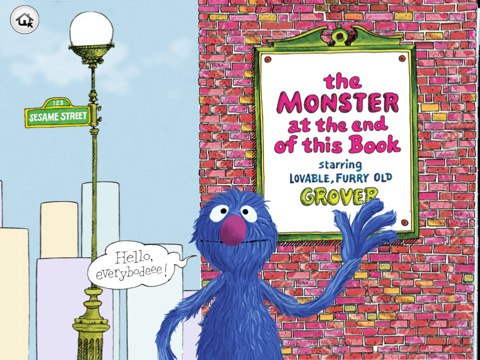
  • The Monster at the End of This Book ($3.99)- Lively interactive animation that responds to your child’s touch, narration by lovable old Grover himself, engaging activities that empower readers to decide how and when to move the story forward-—plus encourage kids’ spatial development and listening skills, word highlighting to help build beginning reader skills and playful parent tips from the educational experts at Sesame Street .

  • My Very First App ($1.99) – The app contains 3 levels of game play: Easy (ages 1-3), Medium (ages 2 and up) and Hard (ages 3 and up). These gently increasing stages of difficulty can grow along with your child, and continue to challenge them throughout their early learning years. In Easy mode the screen is divided in half—just like the original books—and your child can swipe the lower and upper halves to find a match. The Medium and Hard modes are based on the game of Memory; players are presented with a set of cards face down and must find a pair by flipping over cards and identifying their matches or their related concepts.

  • Interactive Alphabet ($2.99)- Universal app for iPad/iPhone/iPod: You can use it at home or on the go! Buy it once, take it everywhere; fun original artwork, animations, music, and sound effects engage and capture your child’s curiosity. Memorable and unique interactivity keep your child coming back for more fun and upbeat Original Music — keeps you dancing, not wincing (parent friendly!). Our very own Alphabet/ABC song included!, Baby Mode option (Auto advances cards every 15 seconds), Phonic Sounds, Upper and Lower-case letters

These are just some of the titles but we will provide even more every week to complement all Papa Heroes’ powers.